/images/art2.png

Design Pattern

Design pattern

Factory pattern

const createDataBaseClass = (dbName: DBOption) => {
  switch (dbName) {
    case 'InMemo':
      return InMemoryDataBase;
    case 'SQL':
      return SQL_DB;

    // ...
    // you can add anything else
    default:
      break;
  }
};

Singleton pattern

The Singleton Pattern limits the number of instances of a particular object to just one. This single instance is called the singleton.

export const createDataBase = <T extends BaseRecord>() => {
    const db = new InMemoryDataBase<T>();
    return db;
};

const pokemonDB = createDataBase<Pokemon>();

pokemonDB.set({
    id: 'Bulbasaur',
    attack: 59,
    defense: 10,
});

console.log(pokemonDB.get('Bulbasaur'));

A CPP way to do

const createDataBase2 = <T extends BaseRecord>() => {
    class InMemoryDataBase2 implements DataBase<T> {
        private db: Record<string, T> = {};
        static instance: InMemoryDataBase2 = new InMemoryDataBase2();

        private constructor() {} // private constructor is necessary

        public set(newValue: T): void {
            this.db[newValue.id] = newValue;
        }

        public get(id: string): T | undefined {
            return this.db[id];
        }
    }

    return InMemoryDataBase2;
};
const PokemonDB2 = createDataBase2<Pokemon>();
PokemonDB2.instance.set({
    id: 'Bulbasaur',
    attack: 59,
    defense: 10,
});

Observer (pub/sub) pattern

Observer

const createObserver = <EventType>(): ({
  subscribe: (listener: listenerType<EventType>) => () => void, // take listener and return an unsubscribe function
  publish: (event: EventType) => void,
}) => {
  let listeners: listenerType<EventType>[] = [];
  return {
    subscribe: (listener: listenerType<EventType>): (() => void) => {
      listeners.push(listener);
      return () => {
        listeners = listeners.filter((l) => l !== listener);
      };
    },
    publish: (event: EventType) => {
      listeners.forEach((l) => l(event));
    },
  };
};

Real use case

interface BeforeAddValueEvent<T> {
  newValue: T;
  value: T;
}
interface AfterAddValueEvent<T> {
  value: T;
}

class InMemoryDBWithObserver<T extends BaseRecord> extends InMemoryDataBase<T> {
  public set(newValue: T): void {
    this.BeforeAddValueObserver.publish({
      newValue,
      value: this.db[newValue.id],
    });
    this.db[newValue.id] = newValue;
    this.AfterAddValueObserver.publish({
      value: newValue,
    });
  }

  public get(id: string): T | undefined {
    return this.db[id];
  }
  // observer
  private BeforeAddValueObserver = createObserver<BeforeAddValueEvent<T>>();
  private AfterAddValueObserver = createObserver<AfterAddValueEvent<T>>();

  onBeforeAddValue(listener: listenerType<BeforeAddValueEvent<T>>): () => void {
    return this.BeforeAddValueObserver.subscribe(listener);
  }

  onAfterAddValue(listener: listenerType<AfterAddValueEvent<T>>): () => void {
    return this.AfterAddValueObserver.subscribe(listener);
  }

  // visiter pattern
  visit(visitor: (item: T) => void): void {
    Object.values(this.db).forEach(visitor);
  }

  // strategy pattern
  getBest(strategy: (item: T) => number): T {
    let findRes: { max: number; res: T | null } = {
      max: -Infinity,
      res: null,
    };

    return Object.values(this.db).reduce((prev, cur) => {
      let score = strategy(cur);
      if (prev.max < score) return { max: score, res: cur };
      return prev;
    }, findRes).res;
  }
}

const pokemonDB = new InMemoryDBWithObserver<Pokemon>();

pokemonDB.onBeforeAddValue((event) => {
  console.log('Before add value');
  console.log(event);
});

const unsubscribe = pokemonDB.onAfterAddValue((event) => {
  console.log('After ADD A Value');
  console.log(event);
});
pokemonDB.onAfterAddValue((event) => {
  console.log('-----------');
});

pokemonDB.set({
  id: 'Bulbasaur',
  attack: 59,
  defense: 10,
});
pokemonDB.set({
  id: 'Bulbasaur',
  attack: 20,
  defense: 30,
});

unsubscribe();

pokemonDB.set({
  id: 'Spinpsaur',
  attack: 159,
  defense: 110,
});

console.log('Visit pattern:');
pokemonDB.visit((item) => console.log(item));

console.log('strategy pattern:');
console.log(pokemonDB.getBest((item) => item.defense));

Proxy pattern

Class dbProxy () {
    constructor() {
        this.db = new DB();
        this.dbCache = new Map();
    }

    get(key){
        if(this.dbCache.has(key)) return dbCache.get(key);

        const res = db.get(key);
        dbCache.set(key, res);
        return res;
    }
}


let db = new dbProxy();

db.get('a');
db.get('a'); // cache

Adaptor pattern

Typescript overview

type

Union type & Literal type

const add = (
    a: number | string,
    b: number | string,
    type?: 'number' | 'string'
): number | string => {
    if (type === 'string') {
        return a.toString() + b.toString();
    } else return +a + +b;
};

console.log(add(1, 2));

Array

type Book = {
    id: string;
    name: string;
};

let books: Book[] = [];

unknown

let test1: unknown;
let test2: string;

test1 = 'xyz'; // ok
// test2 = test1; // error
function f1(a: any) {
    a.b(); // OK
}
function f2(a: unknown) {
    a.b(); //error
    // Object is of type 'unknown'.
}

Type a Function

type listenerType<EventType> = (event: EventType) => void;

Assign a plain Object

type Primitive = bigint | boolean | null | number | string | symbol | undefined;

type PlainObject = Record<string, Primitive>;
const obj1: PlainObject = { a: 1 }; //✅
const obj2: PlainObject = { a: 1 }; //❌
const obj3: PlainObject = new myClass(); //❌

Assign a nested plain Object

type Primitive = bigint | boolean | null | number | string | symbol | undefined;

type JSONValue = Primitive | JSONObject | JSONArray;
interface JSONObject {
    [key: string]: JSONValue;
}
interface JSONArray extends Array<JSONValue> {}

const obj1: PlainObject = { a: 1 }; //✅
const obj2: PlainObject = { a: { b: { c: 3 } } }; //✅
const obj3: PlainObject = new myClass(); //❌

Type Template arrow function example

export const useFetchAPI = <T extends unknown>(
    url: string,
    method: 'POST' | 'GET',
    body?: string | JSONObject
): [string, T | null] => {
    const [fetchStatus, setFetchStatus] = useState('error');
    const [fetchResult, setFetchResult] = useState<T | null>(null);

    useEffect(() => {
        const apiMockFetch: () => Promise<{
            status: string;
            requestId: string;
            result: T | null;
        }> = () => {
            return new Promise((resolve) => {
                setTimeout(() => {
                    resolve(someData);
                }, 1000);
            });
        };

        const fetchData = async () => {
            const { status, result } = await apiMockFetch();
            setFetchStatus(status);
            if (result !== undefined) {
                setFetchResult(result);
            }
        };
        if (fetchStatus !== 'success') fetchData();
    }, [url, method, body, fetchStatus]);
    return [fetchStatus, fetchResult];
};

Type & interface

type Book = {
    id: string;
    name: string;
};

interface Book {
    id: string;
    name: string;
}

React Logic Reuse Example

React logic extraction

Check this post

Example code

This example demonstrate one single feature using four different feature to archive code split

Code running there: –>Link<–

import { useState, useEffect } from React;

const Styles = {
    redBorder: {
        border: '1px solid #f00',
    },
};

const MouseDisplay = ({ x, y }) => {
    return (
        <div>
            Mouse at x: {x} ; y: {y}
        </div>
    );
};
const MouseDisplay2 = ({ x, y }) => {
    return (
        <div style={{ color: 'teal' }}>
            Mouse at x: {x} ; y: {y}
        </div>
    );
};

// Normal
export const MouseInfoAndDisplay = () => {
    const [x, setX] = useState(0);
    const [y, setY] = useState(0);
    const handleMove = (e) => {
        setX(e.clientX);
        setY(e.clientY);
    };
    return (
        <div style={Styles.redBorder} onMouseMove={handleMove}>
            <MouseDisplay x={x} y={y} />
        </div>
    );
};

// HOC
const withMouseInfo = (Component) => {
    return (props) => {
        const [x, setX] = useState(0);
        const [y, setY] = useState(0);
        const handleMove = (e) => {
            setX(e.clientX);
            setY(e.clientY);
        };
        return (
            <div style={Styles.redBorder} onMouseMove={handleMove}>
                <Component {...props} x={x} y={y} />
            </div>
        );
    };
};

export const HOCMouseDisplay = withMouseInfo(MouseDisplay);
export const HOCMouseDisplay2 = withMouseInfo(MouseDisplay2);

// Render Props

const MouseRenderProps = ({ render }) => {
    const [x, setX] = useState(0);
    const [y, setY] = useState(0);
    const handleMove = (e) => {
        setX(e.clientX);
        setY(e.clientY);
    };

    return (
        <div style={Styles.redBorder} onMouseMove={handleMove}>
            {render(x, y)}
        </div>
    );
};

export const Mouse = () => {
    return (
        <div>
            <MouseRenderProps render={(x, y) => <MouseDisplay x={x} y={y} />} />
            <MouseRenderProps
                render={(x, y) => <MouseDisplay2 x={x} y={y} />}
            />
        </div>
    );
};

// Customize HOOK

const useMouseState = () => {
    const [x, setX] = useState(0);
    const [y, setY] = useState(0);
    const [node, setNode] = useState(null);
    const handleMove = (e) => {
        setX(e.clientX);
        setY(e.clientY);
    };
    useEffect(() => {
        if (node !== null) {
            node.addEventListener('mousemove', handleMove);
        }
    }, [node]);
    return [x, y, setNode];
};

export const MouseUsingHook = () => {
    const [x1, y1, ref1] = useMouseState();
    const [x2, y2, ref2] = useMouseState();

    return (
        <div>
            <div ref={ref1} style={Styles.redBorder}>
                <MouseDisplay x={x1} y={y1} />
            </div>
            <div ref={ref2} style={Styles.redBorder}>
                <MouseDisplay2 x={x2} y={y2} />
            </div>
        </div>
    );
};


const App = () => {
    return (
        <div
            style={{
                display: 'flex',
                flexDirection: 'column',
                height: '100vh',
                justifyContent: 'space-around',
            }}
        >
            <div>
                Normal: <MouseInfoAndDisplay />
            </div>
            <div>
                HOC: <HOCMouseDisplay /> <HOCMouseDisplay2/>
            </div>
            <div>
                Render Props: <Mouse />
            </div>
            <div>
                Hook: <MouseUsingHook />
            </div>
        </div>
    );
};

Useful Post Archive

React

–>Look this post<–

WEB basic

Please Stop Using Local Storage

https://www.rdegges.com/2018/please-stop-using-local-storage/

JWT authentication: When and how to use it

https://blog.logrocket.com/jwt-authentication-best-practices/#:~:text=A%20JWT%20needs%20to%20be,storage%20(or%20session%20storage).

Graphql

Dispatch This: Using Apollo Client 3 as a State Management Solution

https://www.apollographql.com/blog/dispatch-this-using-apollo-client-3-as-a-state-management-solution/

Apollo Client update cache when delete an item from list

https://github.com/apollographql/apollo-client/issues/6451#issuecomment-775242381

Several things for Graphql Security

https://ithelp.ithome.com.tw/articles/10208008

should I put useQuery inside a useEffect and should I store returned data in state?

https://github.com/trojanowski/react-apollo-hooks/issues/158

Webpack Overview

webpack is a static module bundler for modern JavaScript applications.

Document: https://webpack.js.org/concepts/

Installation

npm i -D webpack webpack-cli

webpack core concept

Entry

An entry point indicates which module webpack should use to begin building out its internal dependency graph. webpack will figure out which other modules and libraries that entry point depends on (directly and indirectly).

Jest Overview

Jest is a JavaScript Testing Framework

Document: https://jestjs.io/docs/en/getting-started

How to use Jest

function.js

const axios = require('axios');

const functions = {
    add: (num1, num2) => num1 + num2,
    isNull: () => null,
    checkValue: (x) => x,
    createUser: () => {
        const user = { firstName: 'Brad' };
        user['lastName'] = 'Traversy';
        return user;
    },
    fetchUser: () =>
        axios
            .get('https://jsonplaceholder.typicode.com/users/1')
            .then((res) => res.data)
            .catch((err) => 'error'),
};

module.exports = functions;

function.test.js

const functions = require('./functions');

// beforeEach(() => initDatabase());
// afterEach(() => closeDatabase());

// beforeAll(() => initDatabase());
// afterAll(() => closeDatabase());

// const initDatabase = () => console.log('Database Initialized...');
// const closeDatabase = () => console.log('Database Closed...');
const nameCheck = () => console.log('Checking Name....');

describe('Checking Names', () => {
    beforeEach(() => nameCheck());

    test('User is Jeff', () => {
        const user = 'Jeff';
        expect(user).toBe('Jeff');
    });

    test('User is Karen', () => {
        const user = 'Karen';
        expect(user).toBe('Karen');
    });
});

// toBe
test('Adds 2 + 2 to equal 4', () => {
    expect(functions.add(2, 2)).toBe(4);
});

// not
test('Adds 2 + 2 to NOT equal 5', () => {
    expect(functions.add(2, 2)).not.toBe(5);
});

// CHECK FOR TRUTHY & FALSY VALUES
// toBeNull matches only null
// toBeUndefined matches only undefined
// toBeDefined is the opposite of toBeUndefined
// toBeTruthy matches anything that an if statement treats as true
// toBeFalsy matches anything that an if statement treats as false

// toBeNull
test('Should be null', () => {
    expect(functions.isNull()).toBeNull();
});

// toBeFalsy
test('Should be falsy', () => {
    expect(functions.checkValue(undefined)).toBeFalsy();
});

// toEqual
test('User should be Brad Traversy object', () => {
    expect(functions.createUser()).toEqual({
        firstName: 'Brad',
        lastName: 'Traversy',
    });
});

// Less than and greater than
test('Should be under 1600', () => {
    const load1 = 800;
    const load2 = 800;
    expect(load1 + load2).toBeLessThanOrEqual(1600);
});

// Regex
test('There is no I in team', () => {
    expect('team').not.toMatch(/I/i);
});

// Arrays
test('Admin should be in usernames', () => {
    usernames = ['john', 'karen', 'admin'];
    expect(usernames).toContain('admin');
});

// Working with async data

// Promise
// test('User fetched name should be Leanne Graham', () => {
//   expect.assertions(1);
//   return functions.fetchUser().then(data => {
//     expect(data.name).toEqual('Leanne Graham');
//   });
// });

// Async Await
test('User fetched name should be Leanne Graham', async () => {
    expect.assertions(1);
    const data = await functions.fetchUser();
    expect(data.name).toEqual('Leanne Graham');
});

Matchers

Doc: https://jestjs.io/docs/en/using-matchers and https://jestjs.io/docs/en/expect

Redux Overview

Redux Document: English 中文

What is Redux

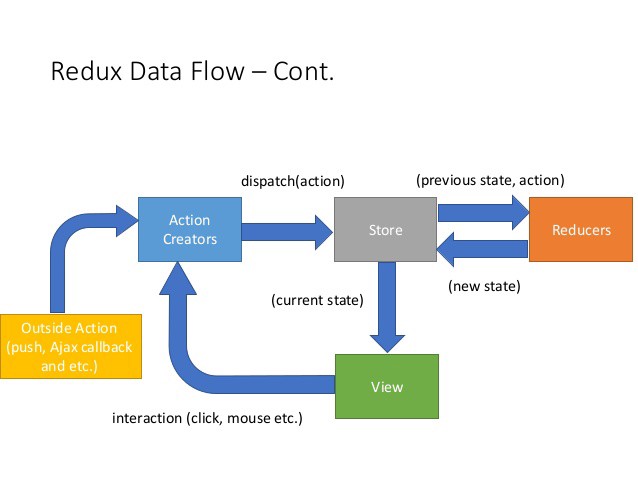
Redux is a predictable state container for JavaScript apps.

Redux also created by Facebook and it is a improvement from Flux. Redux is state management for any view library (mostly react)

When use Redux

Redux is design for complex UI, multiple view source or many interaction with server. If a simple UI, Redux is not necessary

Workflow

Redux Workflow

Example for Redux core

In index.html

React Posts Archive

How to connect your React app to a backend on the same origin

https://flaviocopes.com/how-to-serve-react-from-same-origin/

React Conditional Rendering

Original source: https://www.robinwieruch.de/conditional-rendering-react

Why We Switched to React Hooks

Original source: https://blog.bitsrc.io/why-we-switched-to-react-hooks-48798c42c7f

Why Can’t I Open My React App By Clicking Index.html?

From My Own Post

How To Use an IntersectionObserver in a React Hook

PDF archive: –>Link<–