/images/art2.png

Flex and Grid in CSS

Flex

Cheat Sheet provide by CSS-tricks.com

A Flexbox code Example

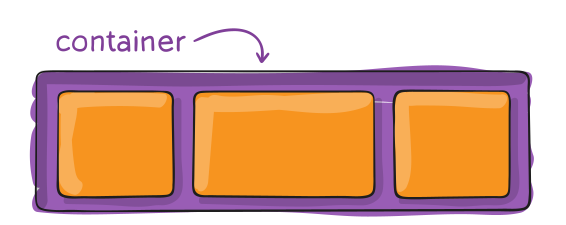
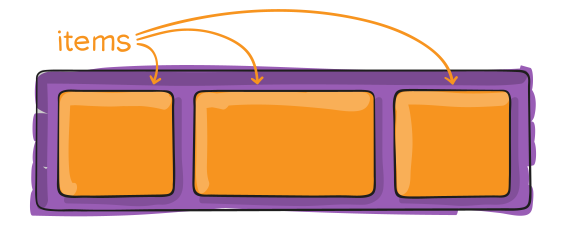
display

.container {
    display: flex;
}

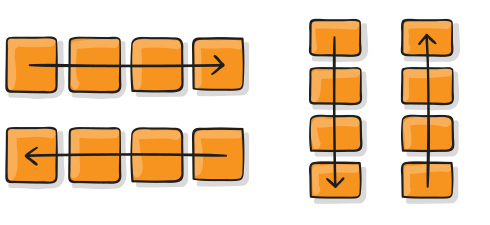
flex-direction

.container {
    flex-direction: row | row-reverse | column | column-reverse;
}

flex-direction

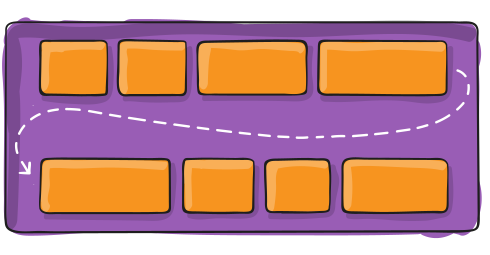
flex-warp

.container {
    flex-wrap: nowrap | wrap | wrap-reverse;
}

flex-wrap

flex-flow

This is a shorthand for the flex-direction and flex-wrap properties.

Hugo Blog CheatSheet

Create new post

hugo new posts/new.md

Add a picture

  1. Basic markdown

    ![<alt name](< The route start from static folder>)

  2. hugo build-in shortcut –> figure (src is start from static folder)

    \{\{< figure src="" title="" >}}

Documentation of ref and relref

\[Neat](\{\{< ref "blog/neat.md" >}})
\[Who](\{\{< relref "about.md#who" >}})

Theme feature

This theme extended short code. See Theme Documentation - Extended Shortcodes

Http Status Code Overview

Reference: https://www.restapitutorial.com/httpstatuscodes.html

⭐︎ -> “Top 10” HTTP Status Code. More REST service-specific information is contained in the entry.

1XX Information

  • 100 continue – Client should continue
  • 101 switching protocols
  • 102 processing (webDAV)

2XX Success

  • ⭐︎200 OK – The request has succeeded.

    General status code. Most common code used to indicate success.

  • ⭐︎201 Created – A new resource has been created and should return a URI.

    Successful creation occurred (via either POST or PUT). Set the Location header to contain a link to the newly-created resource (on POST). Response body content may or may not be present.

HTML5 Overview 🏗

table

table
├── thead
│   └── tr
│       └── th
├── tbody
│   └── tr
│       └── td
└── tfoot
    └── tr
        └── td

Intersection Observer API

const option = {
    root: null,
    rootMargin: '0px',
    threshold: 0.7, // or an array [0.1, 0.2, ...]
};

const callback = (entries, observer) => {
    entries.forEach((entry) => {
        // Each entry describes an intersection change for one observed
        // target element:
        //   entry.boundingClientRect
        //   entry.intersectionRatio
        //   entry.intersectionRect
        //   entry.isIntersecting
        //   entry.rootBounds
        //   entry.target
        //   entry.time
    });
};
const observer = new IntersectionObserver(callBack, option);

observer.observer(nodeOne); //observing only nodeOne
observer.observer(nodeTwo); //observing both nodeOne and nodeTwo
observer.unobserve(nodeOne); //observing only nodeTwo
observer.disconnect(); //not observing any node

When node fulfilled observer option, callback function will run directly

Dynamic Programming Example

Longest common subsequence

This is a typical recursive problem. The pseudocode is:

If S1[i] == S2[j], lcs(S1[i:],S2[j:]) = 1 + lcs(S1[i+1:],S2[j+1:])
else lcs(S1[i:],S2[j:]) = max(lcs(S1[i:],S2[j+1:]), lcs(S1[i+1s:],S2[j:]))

Recursive solution:

int longestCommonSubsequence(string text1, string text2) {
    if(text1.size() == 0 || text2.size() == 0 ){
        return 0;
    }

    if(text1[0] == text2[0]){
        return 1 + longestCommonSubsequence(text1.substr(1, text1.size()-1), text2.substr(1, text1.size()-1));
    }

    return max(longestCommonSubsequence(text1, text2.substr(1, text1.size()-1)),
            longestCommonSubsequence(text1.substr(1, text1.size()-1), text2));
}

Time complexity: O(2^n) Using dp could store the state that already calculate before.

Dynamic Programming 🏗

What is dp problem

DP problem is a programming strategy which use extra space to save time. These problems need to store some state instead of calculate again. For most situation, DP is a strategy to reduce the time consuming for recursive problem.

  1. Memorization
  2. Tabulation

fibonacci example

The classic recursive problem:

const fib = (n) => {
    if (n <= 2) return 1;
    return fib(n - 1) + fib(n - 2);
};

How to memorize :

Go overview 🏗

Download

Go to this link

workspace

Run go env in terminal. The variable GOPATH is the default workspace path. Project should under this folder.

In this workspace, file should structured as how you route your project:

.
├── bin
├── pkg
└── src
    └── <The home web page of version control>
        └── <User name>
            └── <Project name>

Example:

Git overview

Here have some good pictures that is helpful for understanding git and contain the record for git commend

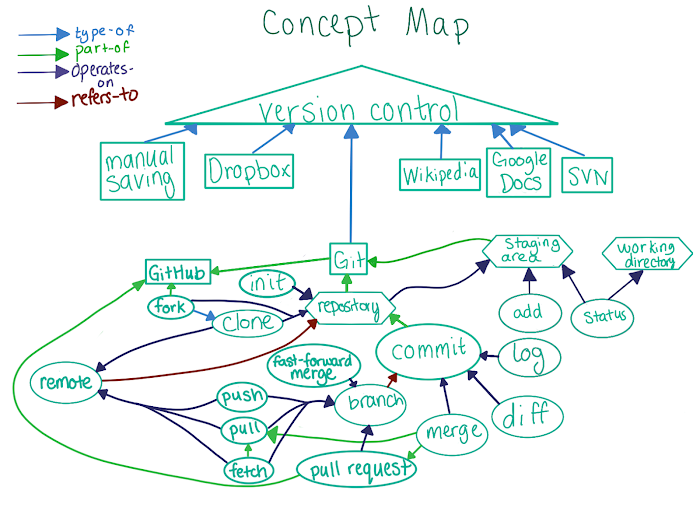
Concept Map

Here is a concept map given by Udacity.com. This picture shows the relationship between these basic git concept.

/images/2019-06-17-gitLearningNote/conceptMap.png

Git Data Transport Map

Git have four working zones. This map shows that using which commend to shift your code from one zone to another.

Vuex Overview

Vuex Document: English 中文

Concept

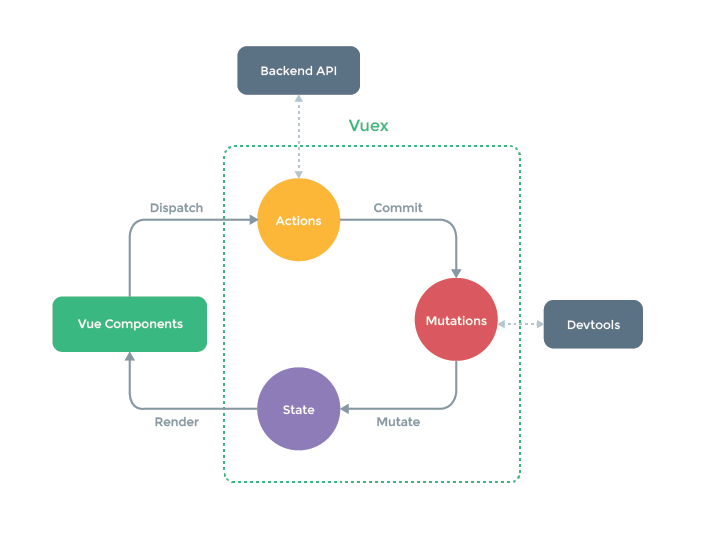
  • State - App-level state/data
  • Getters - Get pieces of state or computed values from state
  • Actions - Called from components to commit mutation (async)
  • Mutations - Mutate the state (sync)
  • Modules - Each module can have its own state, getters, actions and mutations

Work flow

Vuex Workflow

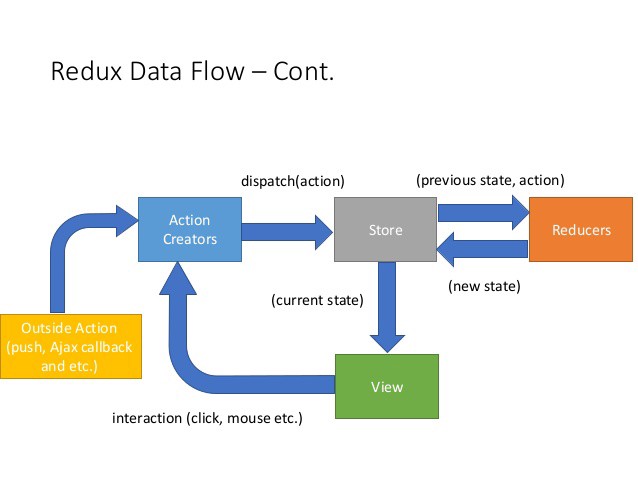
Vuex work flow is similar with Redux => More Detail about Redux

Redux Workflow

Basic structure

In store/index.js

Vue Overview

Vue Document: English 中文

life cycle

/images/2020-05-17-vue/lifecycle.png

Basic structure

<template>
    <div></div>
</template>
<script>
    export default {
        name: '',
        props: [...],
        data() {
            return {};
        },
        computed:{
            ...
        }
        methods: {
            ...
        }
    };
</script>
<style lang="css"></style>

Basic vue function

v-bind

<option
    v-for="(user, idx) in Users"
    :key="idx"
    :value="user.id"
    @mousedown.prevent="multiSelectEvent"
    >{{ user.name }}</option
>

v-bind:value is equal to :value