/images/art2.png

How to demonstrate your front end application on Github by gh-page

Github provide a tech called github pages that can hosted your project directly from repository. Basely push you project into gh-pages branch and the index.html will show on the page which is {<github username>.github.io}/{<repository name>}

gh-pages

gh-pages provide by Tim Schaub is a npm package that can help you push something directly into gh-page branch

Read more detail in repository

command line usage

This package also provide a command line tool:

CSS Overview

CSS cheat sheet: html & css provided by Traversy Media

Font

font-size size

font-family: <FAMILY_NAME>, <GENERIC_NAME>;

font-family: Lobster monospace;

GENERIC_NAME: sans-serif serif monospace;

sans-serif force on connected and serif force on single alphabet.

line-height: 25px;

Import font

Could use google font and add link into index.html or in style.css

Control space

There are three important properties to control the space: padding, margin and border

Border

border-size

border-color

border-width

border-style

border: <border-width> <border-style> <border-color>

Basic Terminal command

Basic

cd route

ls list

pwd show current path

cat concatenate and print file (usually as read file)

touch change file access and modification time; (usually as create file)

Routing

cd <directory>

cd . current

cd .. last

cd ~ home

cd / root

List

ls

ls -a list all included hiding file

ls -l list detail

Move & Copy

cp <name1> <name2> copy

mv <name1> <name2> rename

move one file within this directory to another name.

How to check the Chinese ID is correct

This check method will help you find out whether one digit is wrong or 2 adjacent digit are in reverse order.

Sample code

checkChineseId = (id) => {
    const ID_LENGTH = 18;
    // check type
    if (typeof id !== 'string') {
        console.error('type error');
        return;
    }

    //check length
    if (id.length !== ID_LENGTH) {
        console.error('length error');
        return;
    }

    // check each digit
    for (let i = 0; i < id.length - 1; i++) {
        const e = id[i];
        if (e < '0' || e > '9') {
            console.error('digit error');
            return;
        }
    }

    if (
        id[ID_LENGTH - 1] !== 'x' &&
        id[ID_LENGTH - 1] != 'X' &&
        id[ID_LENGTH - 1] < '0' &&
        id[ID_LENGTH - 1] > '9'
    ) {
        console.error('digit error');
        return;
    }
    //   num: 01 01 00 01 00 05 01 09 04 09 01 02 03 01 00 00 02 10
    //serial: 17 16 15 14 13 12 11 10 09 08 07 06 05 04 03 02 01 00
    //weight = 2^serial % 11
    //weight: 07 09 10 05 08 04 02 01 06 03 07 09 10 05 08 04 02 01 (fix)
    // calculate code
    let weight_sum = 0;
    for (let i = 0; i < id.length - 1; i++) {
        let weight = Math.pow(2, ID_LENGTH - 1 - i) % 11;
        weight_sum += id[i] * weight;
    }
    // checkCode = (12 - weight_sum % 11) % 11
    let checkCode = (12 - (weight_sum % 11)) % 11;
    // compare
    let res = false;
    if (checkCode == 10) {
        res =
            id[ID_LENGTH - 1] === 'x' || id[ID_LENGTH - 1] === 'X'
                ? true
                : false;
    } else {
        res = id[ID_LENGTH - 1] == checkCode ? true : false;
    }

    console.log(`${id} is ${res}`);
    return res;
};

module.exports = {
    checkChineseId,
};

Structured binding

Structured binding is a new feature since c++17

cppreference.com

auto [ identifier-list ] = expression

Bind array

 int main(int argc, char const *argv[])
{
	int test[3] = {1, 2, 3};

	auto [a, b, c] = test; // an new array e copy from test and a = e[0]; b = e[1]; c = e[2];
	auto &[x, y, z] = test; // x = test[0]; x = test[1]; x = test[2]

	cout << ++a << " " << ++b << " " << ++c << " " << endl;
	for (int &i : test)
		cout << i << " ";
	cout << endl;

	cout << ++x << " " << ++y << " " << ++z << " " << endl;
	for (int &i : test)
		cout << i << " ";
	cout << endl;

	return 0;
}

tuple

int main(int argc, char const *argv[])
{
	tuple<int, int, int> test(1, 2, 3);

	auto &[a, b, c] = test; // 1 2 3

	pair<int, char> test2(1, 'c');

	auto &[a2, b2] = test2; // 1 c

	return 0;
}

struct

struct test
{
    int a;
    int b;
};

int main(int argc, char const *argv[])
{

    test one;
    one.a = 1;
    one.b = 2;

    auto &[first, second] = one; // 1 ,2

    return 0;
}

Traverse a tree

Idea to traverse a tree

Tree structure

The tree structure:

struct TreeNode {
    int val;
    TreeNode *left;
    TreeNode *right;
    TreeNode(int x) : val(x), left(NULL), right(NULL) {}
};

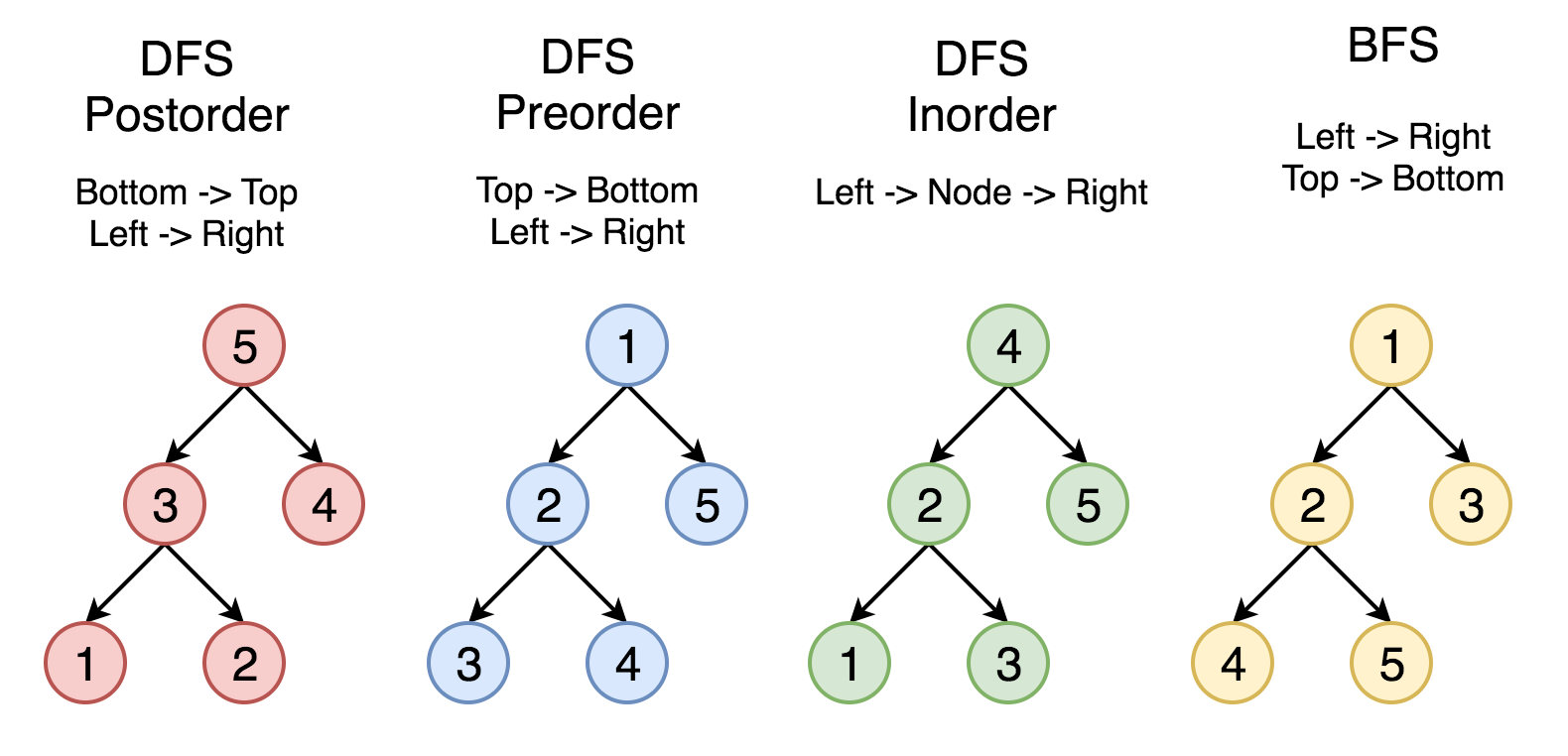
BFS DFS Pre-order In-order Post-order

Relationship:

/images/2020-02-10-traverse-a-tree/145_transverse.png

Iterative

Loop for BFS:

void BFS(TreeNode *root){
    stack<TreeNode *> q;
    q.push(root);
    while(!q.empty()){
        TreeNode *temp = q.front();
        q.pop();
        // do something
        if(temp->left != NULL) q.push(temp -> left);
        if(temp->right != NULL) q.push(temp -> right);
    }
}

Loop for DFS:

How to find next permutation

This is introduce how to find the next lexicographically permutation.

Suppose the permutation is 1 2 3. The next one is 1 3 2.

Algorithm in C++

C++ provide an algorithm called next_permutation to support that. Reference

Example:

#include <iostream>     // std::cout
#include <algorithm>    // std::next_permutation, std::sort

int main () {
  int myints[] = {1,2,3};

  std::sort (myints,myints+3);

  std::cout << "The 3! possible permutations with 3 elements:\n";
  do {
    std::cout << myints[0] << ' ' << myints[1] << ' ' << myints[2] << '\n';
  } while ( std::next_permutation(myints,myints+3) );

  std::cout << "After loop: " << myints[0] << ' ' << myints[1] << ' ' << myints[2] << '\n';

  return 0;

How it work.

There are four step to achieve.

Learn from leetCode

Some strategy learning from leetCode

C++ 2d array

Better use a vector(don’t need to consider allocator)

int row = 10;
int col = 10;
int init = 1;
vector<vector <int>> memos(row, vector<int>(col, init)) // init can ignore
int** a = new int*[rowCount];
for(int i = 0; i < rowCount; ++i)
    a[i] = new int[colCount];

delete ...

Traverse a tree

The tree structure:

Lambda in C++

Introduction of Lambda expression in C++ and how to use it.

What is Lambda in C++

Lambda expression is a new feature since c++11. It is used to create anonymous function object to simplify programming process.

How Lambda expressions are composed

[capture](parameters) mutable -> return type {statement}

// ...
#include <functional>
// ...
std:function<int(int, int)> add = [](int a, int b) -> int {return a+b;};

capture

Capture variables from context.

Crontab overview

What is crontab

Crontab is a toll to schedule commands. You can run your terminal command on a specific schedule like run a command every day or every weekends.

Basic command

crontab [-u user] {-l | -e | -r}

commandutility
-llist your cron job
-rremove your cron job
-eedit your cron job
-uspecific a user

How to schedule a command

Cron job looks like:

# ┌───────────── minute (0 - 59)
# │ ┌───────────── hour (0 - 23)
# │ │ ┌───────────── day of month (1 - 31)
# │ │ │ ┌───────────── month (1 - 12)
# │ │ │ │ ┌───────────── day of week (0 - 6) (Sunday to Saturday;
# │ │ │ │ │                                       7 is also Sunday on some systems)
# │ │ │ │ │
# │ │ │ │ │
# * * * * *  command_to_execute

# export date into a file every minutes
* * * * * date >> ~/Desktop/test.txt

# Mon to Fri, 2:00, 2:30 , 4:00, 4:30
*/30 2,4 * * 1-5 echo "hello world"
symbolmeaning
*any value
,value list separator
-range of value
/step values

crontab.guru

crontab.guru which is a website to check whether your schedule is correct.